MCP
AI assistants that act as you, never as the workspace
The Taktoria team7 min read
The Model Context Protocol, the open protocol Anthropic introduced in November 2024, gives an AI assistant a standard way to use another product's tools. It settles how an assistant calls a tool. It leaves open the question that matters more to a workspace: as whom.
Every Taktoria app has an MCP server in every workspace, and our answer is the same on all of them. An assistant works as the person who connected it, never as the workspace. This post explains why, and where we drew the other lines.
The service account trap
The quickest way to connect an assistant to a product is to give it a service account: a token with broad rights that belongs to nobody in particular. It is quick, and it goes wrong in every way that matters.
The assistant sees everything the token sees, so a question from somebody who may not read a private objective is answered from it anyway. It changes things nobody could change by hand, because the token is an admin. And the audit log says an integration did it, which is the one entry that tells a security team nothing.
The cautious alternative is a narrow, read-only token. That is safe, and it cannot do the work people want to hand over, which is mostly writing: record this check-in, add these go links, open that poll.
Both approaches miss the same thing. An assistant does not work for the company in the abstract. It works for one person, on their behalf, and the product already knows exactly what that person may see and do. The rules are there. The assistant should be held to them.
Automation is a different case. A nightly job that syncs launches into a warehouse belongs to no one person, and for that the API has keys, which speak for the workspace within their scopes. An assistant is not a nightly job. It gets a person's rights, never a workspace's.
One server per workspace, per app
Each workspace has its own server for each app, with the workspace in the address:
https://www.taktoria.com/mcp/<workspace>/<app>
For a workspace called acme, OKR Hub's is https://www.taktoria.com/mcp/acme/okrhub, and LaunchCal's, Dory's, Go Links' and Memegen's sit beside it. That looks like a detail. It decides most of what follows.
Because the address names the workspace, Taktoria knows where you are signing in before you do. A workspace that requires Google sends you to Google, one with single sign-on sends you there, and the consent page shows the workspace with nothing to pick. The token the assistant gets back is bound to that one address, as OAuth's resource indicators (RFC 8707) allow: a token for /mcp/acme/okrhub is refused at /mcp/acme/dory and at /mcp/globex/okrhub. Somebody in two workspaces adds two addresses, and neither assistant can wander into the other.
One server per app, rather than one for everything, means one consent per app. You can let an assistant check in on your OKRs and only read your Dory events. It also keeps each server's tool list short enough for a model to choose from well.
Consent once, checked on every call
On the consent page you choose, for that app, No access, Read only or Read and write. You can give the assistant less than it asked for, never more. A Viewer of the app is offered only Read only, because a Viewer changes nothing in the app either.
The token lasts an hour, and the refresh token behind it thirty days, rotated each time it is used. None of that is what keeps the connection honest. What does is that nothing about your rights is stored on the token. Every request is checked afresh, in order: the token is valid and was issued for this address; its connection has not been revoked; you are still a member of the workspace; the workspace still allows MCP connections; you signed in with Google if the workspace requires it; the workspace subscribes to the app and you hold a seat on it; and your role in the app, today, allows what was granted. Made a Viewer, the same connection becomes read-only on its next call. Removed from the workspace, it stops.
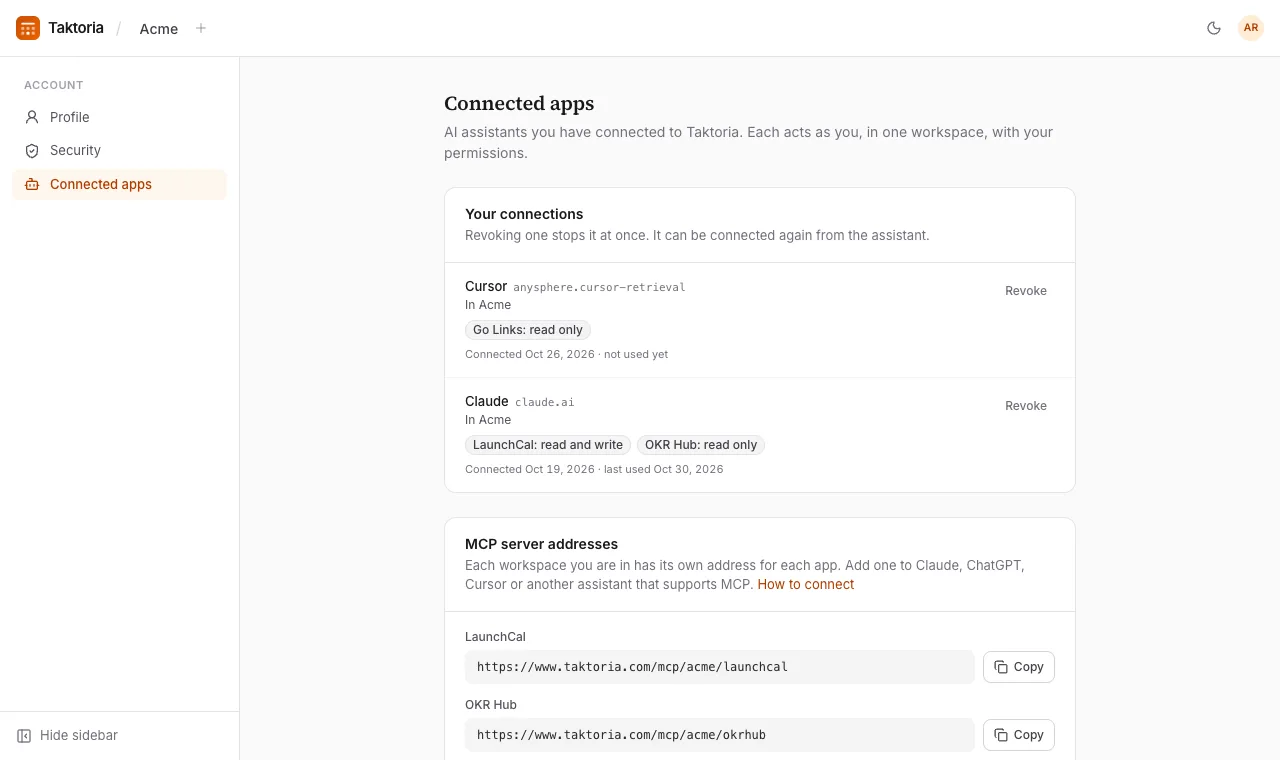
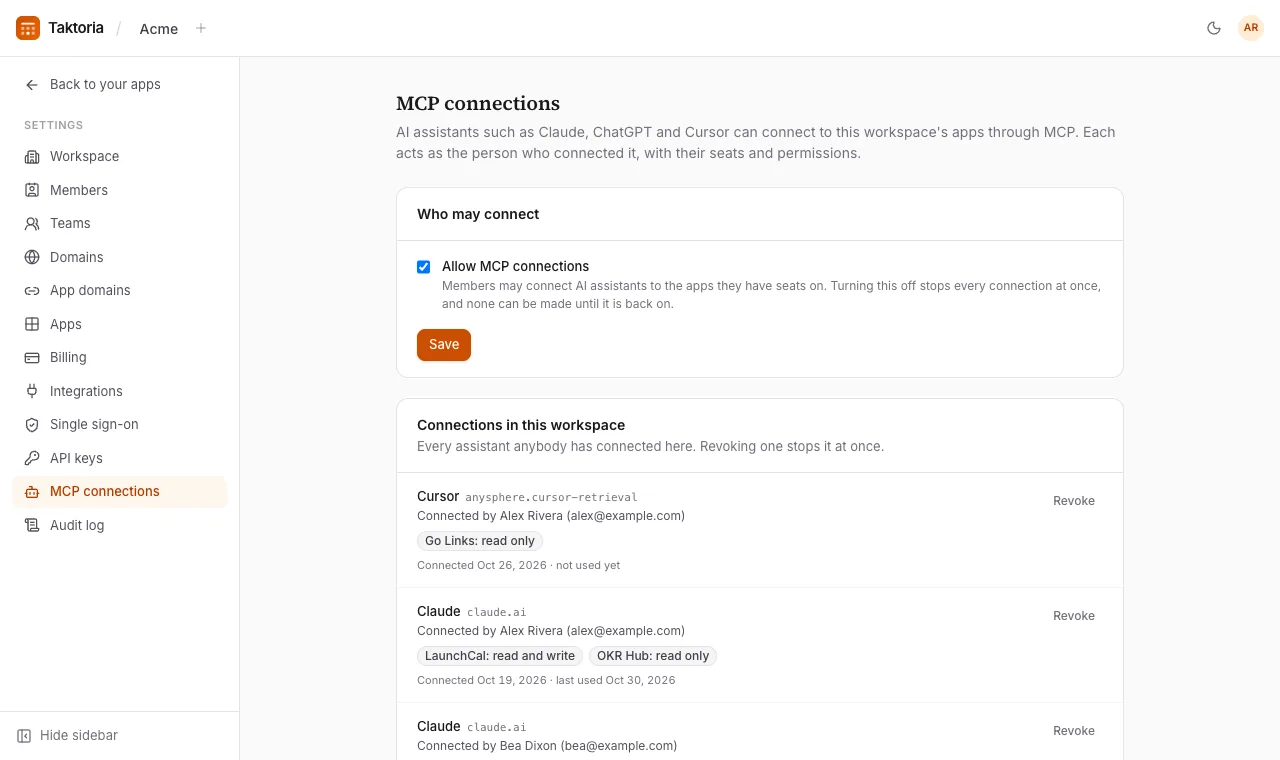
So revoking is immediate wherever it is done. You can revoke a connection yourself in Account → Connected apps, a workspace admin can revoke anybody's in Settings → MCP connections, and the admin can turn MCP off for the whole workspace with one switch. Every change an assistant makes is in the audit log under your name, with the assistant named beside it, so the record says both who decided and what did the typing.
The same rules as the app, not a copy of them
An assistant's tools call the same functions as the app's forms and the REST API: one function per rule, which takes who is acting and what they asked. When OKR Hub's record_check_in tool runs, the code that decides whether you may check in on that key result is the code the check-in form runs. A private objective you have no part in is not found. A go link that names its editors can be changed only by them, its creator or an admin of Go Links. A Dory event closed to a list of hosts is "not found" to the assistant of anybody who may not run it, exactly as it is in the app.
Scopes on a connection are a ceiling, not a grant. okrhub:write lets an assistant use OKR Hub's write tools, within what you may change; it never lets it change what you could not. Write tools are listed only to a connection allowed to write, and each tool says whether it only reads and whether it destroys anything, using the protocol's own annotations, so a client can ask before it acts.
One power is missing on purpose. No MCP scope stands for the workspace's MCP connections, so an assistant can never list, revoke or turn off connections, its own included. Deciding which assistants may act in a workspace is a job for the people in it.
Skills teach the job, not just the tools
Tools are verbs. Knowing which verbs to use, in what order, and what not to do is the job, and a model meeting OKR Hub for the first time does not know it. So every server also carries skills: short guides in the Agent Skills SKILL.md format, served by the MCP Skills extension (SEP-2640), and offered as resources, prompts and the server's instructions for clients that do not support it yet.
OKR Hub has four: a status report, drafting next quarter's OKRs, a mid-quarter check-in and scoring the quarter. The check-in skill, at skill://okrhub/mid-quarter-check-in/SKILL.md, tells the assistant to take "this quarter" from the workspace's fiscal year rather than the calendar, to score where a key result stands now rather than where it might end, that check-ins are never edited, and to read the scores back and record only what the person approved. It also says what not to do: no bulk scoring, which skips the notes that make a check-in worth reading.
Dory's skills prepare an event, moderate a live Q&A, run a poll and write a recap. LaunchCal's include planning a launch, working through a review queue and saying whether a launch is ready to go. A skill that changes things is offered only to a connection allowed to write, so a read-only assistant is never taught a job it cannot do.
Where we drew the lines
Acting as you is the rule. A few places go further, because some things are worth something only if a person does them.
An assistant never answers a Dory poll. Dory's server runs events: it opens a poll, closes it and reads the results back. The attendee's side (joining with a code, asking, upvoting a question, answering a poll) is not on it at all. A room's answer is evidence of what the people in the room think, and an assistant answering for them would quietly spoil the count. Attendees hold a code, not a seat, and the server is for people with seats.
It never names who asked. Dory's recap skill tells the assistant never to name the asker of an anonymous question, or guess who it was. Anonymity that an assistant can undo was never anonymity. We wrote more about why that matters in The question nobody asks out loud.
It confirms before it writes. Nearly every skill that changes something asks the assistant to show the person what it is about to do first, and to leave new things as drafts until they agree.
If you are connecting assistants to your own product, the same principles travel:
- Act as a person. Reuse the rules you already enforce for people, and never give an assistant a super-user to save time.
- Put the tenant in the address, and bind each token to it.
- Store nothing on the token you would have to take back. Check membership, seat and role on every call.
- Keep assistants off the audience's side of anything that counts opinions.
- Teach the job, with a list of what not to do.
The help centre's AI assistants article shows how to connect Claude, ChatGPT, Cursor or Claude Code, and the MCP reference has every tool. Your workspace's addresses are under Account → Connected apps.
How we think about launches, OKRs, meetings, links and memes, and the API and AI assistants behind them.
Connect an AI assistant